



You are using an out of date browser. It may not display this or other websites correctly.
You should upgrade or use an alternative browser.
You should upgrade or use an alternative browser.







SITE UPGRADE INBOUND
- Thread starter Telos
- Start date
ESnel
Active member

chuckbuster
Well-known member
- Joined
- Apr 16, 2012
- Messages
- 3,455
- Reaction score
- 270
- Points
- 83
- Location
- The Land of Beer and Popcorn.
What is this place?! I seem to have died and gone to some type of forum hell.


Dewey Cox
Señor Member
Dewey Cox
Señor Member
I'd elaborate but its a waste of time to type too long a paragraph just to be shut down


Grizz Axxemann
Part-Timer

"How do you get to the last post of a thread ? There used to be a LAST button."Right before the thread title is a little double down arrow. Click that.

Rory McCanuck wrote " 'How do you get to the last post of a thread ? There used to be a LAST button.' Right before the thread title is a little double down arrow. Click that.". That's on the "New Topics" list and I've been using it. I mean if you click on the thread title, and you're sitting on page 1, how do you get to the LAST page. I've been typing in the page number of the last page to get there. When commenting on an article, I used to go back to the first page to re-read the original post, and then go to the LAST page to answer a recent post. To get around the upload image instability, I'd go to first page and last page to lock the image in/up.
Click on the wee blue arrows after "Last Post Today, 11:22 AM"how do you get to the LAST page
Rory McCanuck wrote "Click on the wee blue arrows after 'Last Post Today, 11:22 AM' " I don't see "last post" anywhere, but I suspect you mean going to a forum list of threads. That's not what I want to do. I want to navigate within a thread, not leave the thread to the list and come back to the end.
low priority: the "100 posts per page" and "show printable version" thread tools are missing too. I used them to browser find for 3 letter words that the website search wouldn't find.
Gotcha. Yes, the only way I've been able to figure out what the latest posts are is by going to the forum and looking for bold blue topics.Rory McCanuck wrote "Click on the wee blue arrows after 'Last Post Today, 11:22 AM' " I don't see "last post" anywhere, but I suspect you mean going to a forum list of threads. That's not what I want to do. I want to navigate within a thread, not leave the thread to the list and come back to the end.
Ooh, where do you find this?That's on the "New Topics" list and I've been using it
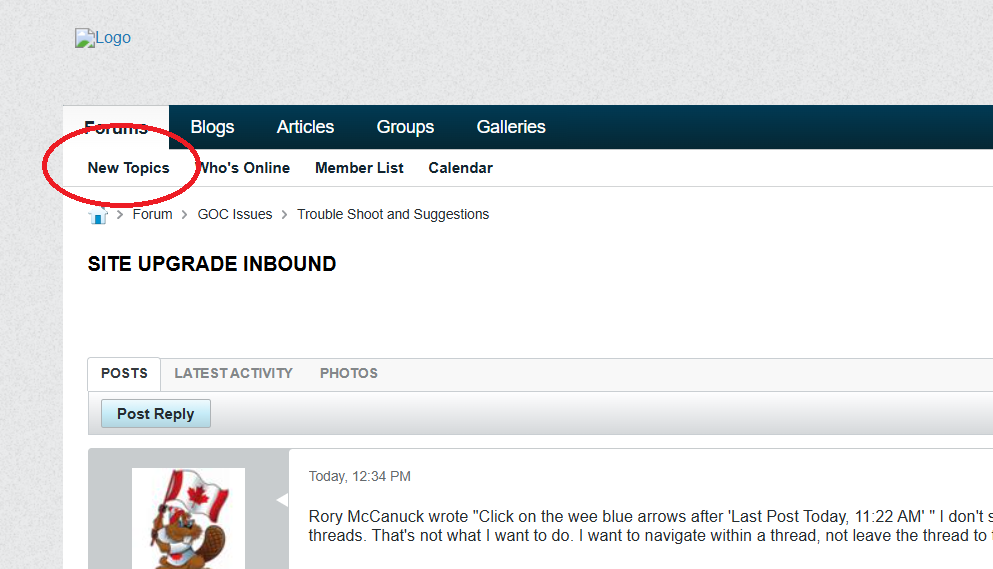
Interesting, I don't have those options. Well, I do, but I have to hit a three bar icon that gives me a drop down menu with those options. I wonder how much of this is a Brave problem?
I've been running Brave again the past few days here at GoC.I wonder how much of this is a Brave problem?
If my browser is less than 1100 pixels wide, I get the three bars. If my browser is wider than that, I get the words as shown in my image.Interesting, I don't have those options. Well, I do, but I have to hit a three bar icon that gives me a drop down menu with those options.
Ahh. I'm half blind and have things set at 150%. If I shrink it down to 130%, they appear.

Big-Boss-Man
Well-known member
- Joined
- Aug 7, 2016
- Messages
- 10,618
- Reaction score
- 671
- Points
- 113
Interesting, I don't have those options. Well, I do, but I have to hit a three bar icon that gives me a drop down menu with those options. I wonder how much of this is a Brave problem?
no i use brave and see it how rb does.
I haven't been able to upload an image yet. I press "Send file to server" and it never completes, or it says "Image source URL is missing" even though I'm on the upload tab. The image I'm trying to upload is a .jpg that's 54kb in size.

JustBen
Resident Combine Pilot
Guys bare with us here, I'm back on the job working on it  Ryan called me in from retirement.
working on 403 right now.
Colors for the site changed and will be tweeked.
Logos are back
Working on image uploads
Ryan called me in from retirement. working on 403 right now.
Colors for the site changed and will be tweeked.
Logos are back
Working on image uploads
Dewey Cox
Señor Member
Dewey Cox
Señor Member
Nice work. (And for the sake of trouble shooting, I still couldn't quote your post, or make a second paragraph )
Nice work. (And for the sake of trouble shooting, I still couldn't quote your post, or make a second paragraph )
testing



Said I needed to post more than 3 characters
Testing image uplaod
Can someone else try

Said I needed to post more than 3 characters
Try again should everyone should be able to just post a picture now without text

