








Uploading Pictures from your computer directly into a thread

jwirecom109

GoC Co-Founder
Staff member
Joined
Mar 30, 2012
Messages
11,412
Reaction score
5
Points
10,038
Location
Northern BC
A Step by Step Guide to posting pictures from your computer.

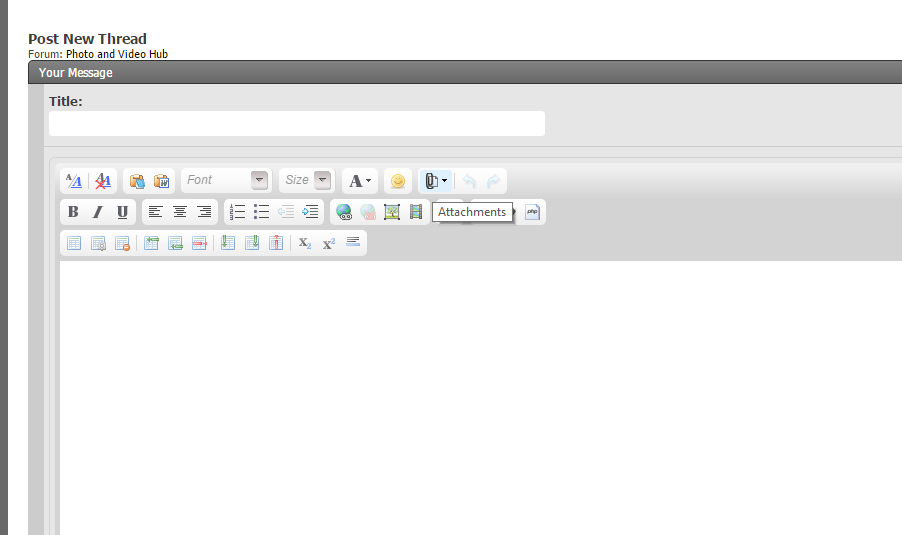
1. Go to Advanced Settings in your Reply or New post options.
2. Click on Attachments
1.png


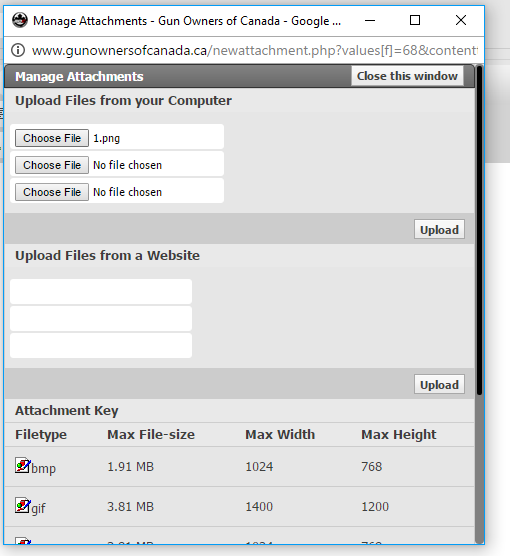
You can upload 3 attachments at a time.

3. Click on choose File, and choose the files you want to upload
2.png


4. Click upload after you have chosen your files
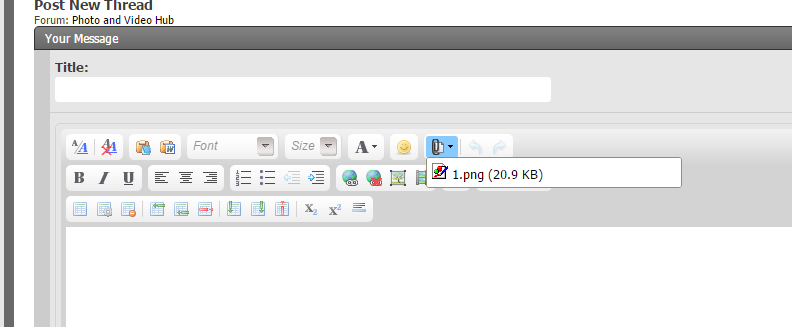
5. Click the arrow side of the attachments and it will show the pictures uploaded, Pick the picture you want in the area you want it and click on it
3.png


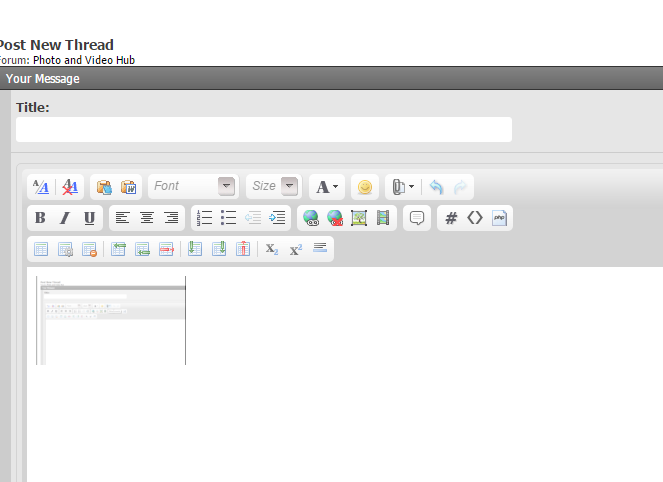
6. The picture will upload to your text area, it removed it you can delete it just like text (with your backspace key) It may show up as a smaller image, but once the thread is posted it will enlarge.
4.png


7. Click post reply or thread and your picture is added to your thread.
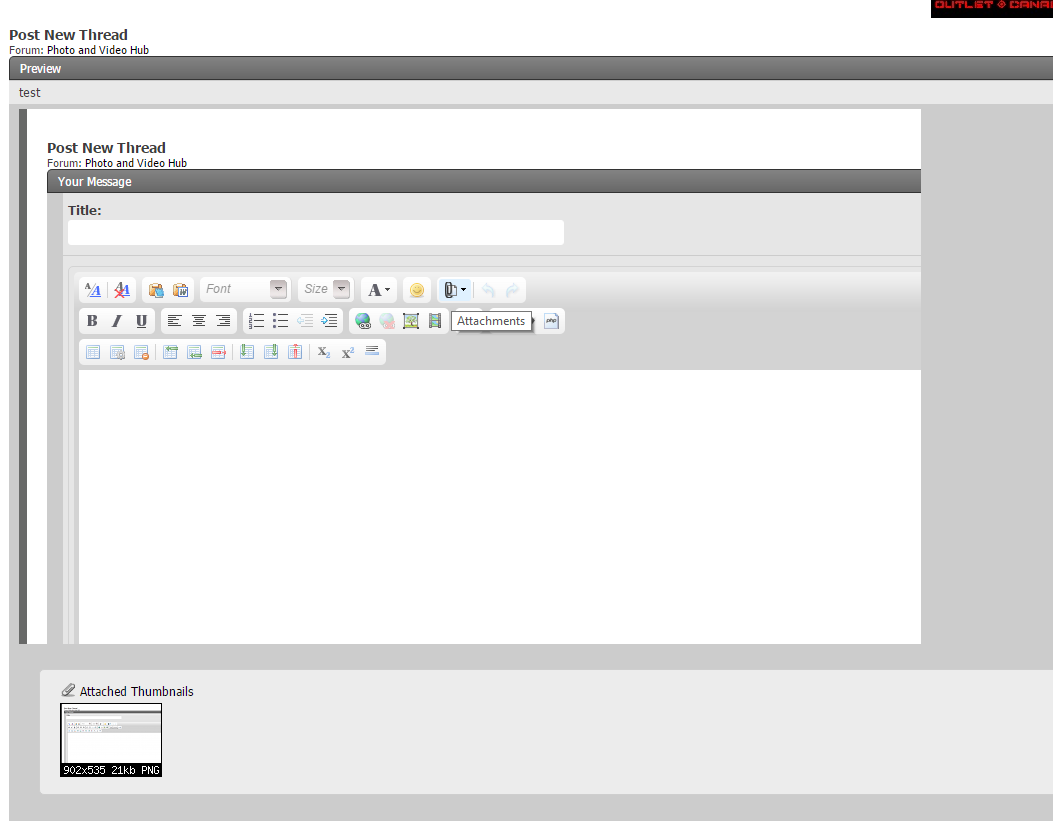
5.png
 
Just out of curiosity, could you elaborate on that?

All free accounts are already blocked from linking the photos to forums, sites, etc like this.

Most of the paid accounts will be blocked soon.

The only way to link (post) images from PB soon will be with a $400(USD) per year account. Yep. In order to do with PB what it was designed to to, will cost $500can per year. It's either a ploy to make something like $100 a year seem palatable (which may be corporate suicide) or it's a real, permanent move, which would be full on, full retard, corporate suicide.

If you have images on your PB account that aren't on your hard drive or cloud somewhere, get them copied over now, when the image posting function gets blocked, so does your ability to copy the image back to yourself. Essentially, they are holding images hostage. So, anything that really belongs in a family photo album, or anything else important, get onto your drive quick.
 
I cannot upload pictures using Internet Explorer but no problem using Microsoft Edge.
 
I thought you could embed from a Microsoft live or google drive account?

I've not tried in a long time, though
 
upload doesn't work on my firefox.
I have to use safari.
 
I did have, until I wanted to use it, the option to load from url or my own pc, upon selecting "insert image".

And there is no attachments paperclip option in my editor. I chose go advanced.

What did I eff up?
 
You don't need to go into Advanced.
When the grey window pops up, hit browse and find the pic you want.
After it is selected, directly under the browse button is a thing that says upload file.
Hit that, and (attach)6969(attach) will be inserted into the post where your cursor was.
All done.
 
You don't need to go into Advanced.
When the grey window pops up, hit browse and find the pic you want.
After it is selected, directly under the browse button is a thing that says upload file.
Hit that, and (attach)6969(attach) will be inserted into the post where your cursor was.
All done.

That is what is no longer an option. All I get is

Insert Image
X
Add an Image from Url
Allowed Filetypes: jpg, jpeg, png, gif
URL
 
Well, it seems like I lose the option for pics from my pc on threads I start. I tried to insert on someone else's thread and the option was available as you described.
 
I tried this earlier and the only option it gives me is to upload from a url. The computer option did not show up.


Forgot your password?
Don't have an account? Register now
or